
How to Check AIOU Admission Confirmation? Complete details
How to Confirm Your Admission in Allama Iqbal Open University AIOU
After submitting your admission form at Allama Iqbal Open University (AIOU), the next important step is to confirm your admission status. Many students worry about not receiving confirmation messages or login credentials on time.
This guide explains how to check your admission, what to do if there’s a delay, and tips for new students.
Step 1: Wait for SMS or Email Confirmation from AIOU
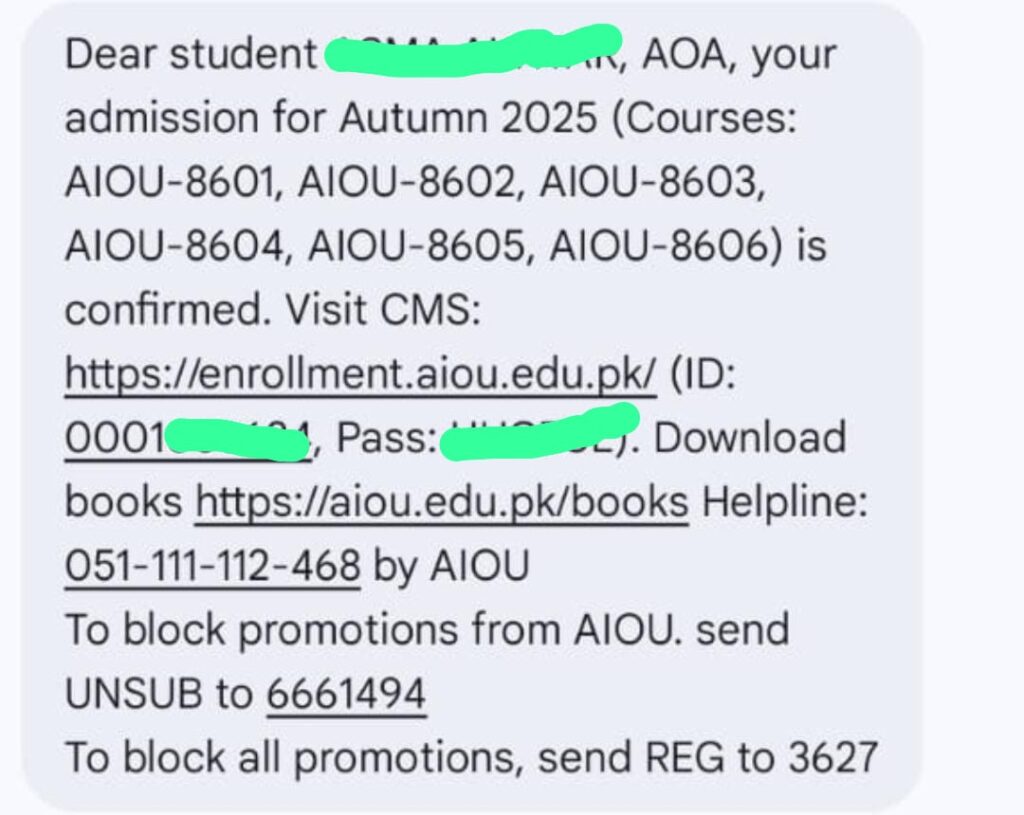
Once your admission is successfully processed by the university, AIOU will send you the following credentials:
- CMS Registration ID
- Password for CMS Portal
These login details will be sent to your mobile number and email address that you used while submitting your application.
Receiving the CMS login credentials is the first official confirmation that your admission has been accepted.
Your AIOU Admission Confirmation Message will look Like this
Step 2: Log in to the AIOU CMS Portal
Use the link below to log in to your student account:
Once logged in, you can:
- View your personal profile
- Check your admission status
- View enrolled courses
- Track your fee payment history
- Download soft copies of your books (if available)
Step 3: AAGHI LMS Portal Access For B.Ed, BS, MA, MSc, M.Ed, M.phill and PhD Students
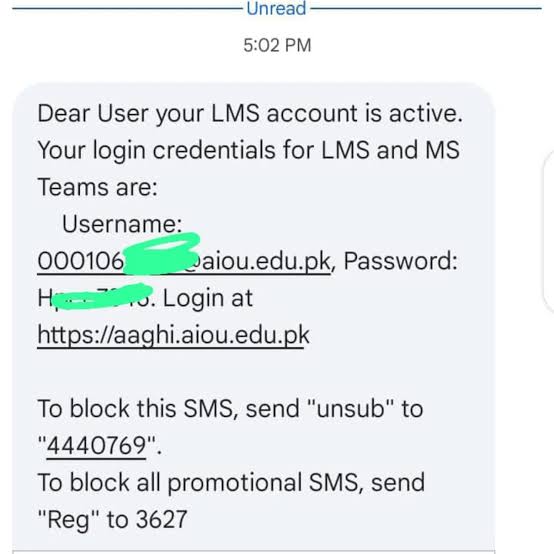
After your CMS login is confirmed, AIOU will also create your AAGHI LMS Portal account. This platform is where you:
- Attend online classes
- Download study materials
- Submit assignments
- Take quizzes and exams
Use the following link to access the AIOU LMS Portal:
AIOU LMS Portal SMS and Email Will look Like this
Important Tip for AIOU Admission Confirmation
Always use a correct and active mobile number and email address when applying. This ensures that you receive your CMS and LMS login credentials on time.
What to Do If You Don’t Receive AIOU Admission Confirmation SMS or Email?
Sometimes, students don’t receive their CMS ID or password even after 2 months of applying. If this happens, you must act immediately.
Common problems caused by delay:
- No access to course materials
- Missed assignment deadlines
- Inability to attend online classes
- Missed exams or quizzes
How to Contact AIOU for Admission Confirmation
If you don’t receive any confirmation after waiting 4 to 8 weeks, contact AIOU through any of the following ways:
Contact For CMS Id And Password:
If You haven’t Received your CMS ID and password, you should type an Email Like this
Respected Sir/Madam
I am a student of AIOU and I have not received my CMS login ID and password yet. Due to this issue, I am unable to access my CMS account and continue my academic activities.
Kindly provide me with my CMS login ID and password or guide me on how I can receive it.
My Details are as follows:
Name: (write your name)
Father’s Name: (write your father name)
CNIC No: (write your CNIC or b.form No)
Program: (write your Program name like matric, FA, BA)
Mobile Number: (write your mobile number)
And Send this Email at support@aiou.edu.pk
You can Also call AIOU Support at 051 111 112 468.
Contact For LMS ID and Password
If you haven’t Received your LMS password, you should type an Email Like this
Respected Sir/Madam
I am a student of AIOU and I have not received my LMS login password yet. Due to this issue, I am unable to access my LMS account and continue my academic activities.
Kindly provide me with my LMS login password or guide me on how I can receive it.
My Details are as follows:
Name: (write your name)
Father’s Name: (write your father name)
ID: (write your CMS Id)
Program: (write your Program name )
Mobile Number: (write your phone number)
And send Email at the following Email I’d according to your Region.
mirpur
lms_mirpur@aiou.edu.pk
muzaffarabad
rawalakot
lms_rawalakot@aiou.edu.pk
dera murad jumali
lms_dmjamali@aiou.edu.pk
gawadar
lms_turbat@aiou.edu.pk
turbat
lms_turbat@aiou.edu.pk
kalat
lms_kalat@aiou.edu.pk
quetta
lms_quetta@aiou.edu.pk
zhob
lms_zhob@aiou.edu.pk
gilgit
lms_gilgit@aiou.edu.pk
nagar
lms_nagar@aiou.edu.pk
skardu
lms_skardu@aiou.edu.pk
islamabad
lms_isb@aiou.edu.pk
chitral
lms_chitral@aiou.edu.pk
mardan
lms_mardan@aiou.edu.pk
peshawar
lms_peshawar@aiou.edu.pk
swat
lms_swat@aiou.edu.pk
timergara
lms_timergara@aiou.edu.pk
d.i.khan
lms_dikhan@aiou.edu.pk
kohat
lms_kohat@aiou.edu.pk
abbottabad
lms_abbottabad@aiou.edu.pk
attock
lms_attock@aiou.edu.pk
bahawalnagar
lms_bahawalnagar@aiou.edu.pk
bahawalpur
lms_bahawalpur@aiou.edu.pk
chakwal
lms_chakwal@aiou.edu.pk
d.g.khan
lms_dgkhan@aiou.edu.pk
faisalabad
lms_faisalabad@aiou.edu.pk
gujranwala
lms_gujranwala@aiou.edu.pk
jhang
lms_jhang@aiou.edu.pk
jhelum
lms_jhelum@aiou.edu.pk
kasur
lms_kasur@aiou.edu.pk
lahore
lms_lahore@aiou.edu.pk
mianwali
lms_mianwali@aiou.edu.pk
multan
lms_multan@aiou.edu.pk
narowal
lms_narowal@aiou.edu.pk
rahim yar khan
lms_rykhan@aiou.edu.pk
rawalpindi
lms_rawalpindi@aiou.edu.pk
sahiwal
lms_sahiwal@aiou.edu.pk
sargodha
lms_sargodha@aiou.edu.pk
shiekhupura
lms_sheikhupura@aiou.edu.pk
sialkot
lms_sialkot@aiou.edu.pk
toba tek singh
lms_ttsingh@aiou.edu.pk
vehari
lms_vehari@aiou.edu.pk
dadu/moro
lms_dadu@aiou.edu.pk
hyderabad
lms_hyderabad@aiou.edu.pk
karachi
lms_karachi@aiou.edu.pk
larkana
lms_larkana@aiou.edu.pk
malir
lms_malir@aiou.edu.pk
mithi
lms_mithi@aiou.edu.pk
sukkur
lms_sukkur@aiou.edu.pk
thatta
lms_thatta@aiou.edu.pk
Bonus Tips for New AIOU Students
Here are some helpful tips for students just starting at AIOU:
- Save your CMS and LMS login info in a notebook or mobile notes app.
- Check the AIOU academic calendar regularly for assignment and exam dates.
- Monitor your email and SMS alerts to stay updated.
- Keep a copy of your admission receipt and application printout.
- Visit our AIOU Help Section for solved assignments, past papers, and textbooks.
Key Points:
Step | Action |
Admission Confirmation | Wait for SMS/Email with CMS ID & Password |
CMS Login | |
What You Can Do on CMS | View profile, enrolled courses, download books, check fees |
LMS Portal for Online Learning | |
Delay in Admission Confirmation | Contact AIOU regional office or helpline |
Helpline | 051-111-112-468 |
Common Student Tip | Save login details, check academic calendar, monitor SMS/Email |
Final Note
For latest updates, solved assignments, Past papers, Assignment Question papers, books and student support — Visits our AIOU Section and follow us on WhatsApp and Facebook.